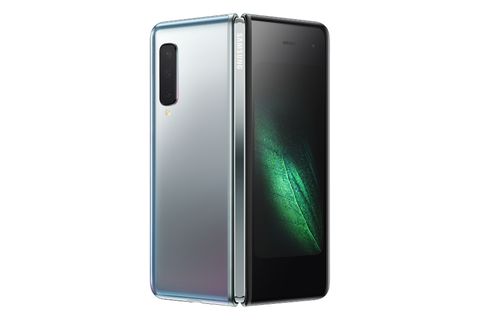
Samsung first teased its foldable phone back in November, and at the company’s Galaxy Unpacked event today, it’s further detailing its foldable plans. Samsung’s foldable now has a name, the Samsung Galaxy Fold, and the company is revealing more about what this unique smartphone can do. Samsung is planning to launch the Galaxy Fold on April 26th, starting at $1,980, through AT&T and T-Mobile in the US, with a free pair of Samsung’s new wireless earbuds. There will be both an LTE and 5G version of the Galaxy Fold, and Samsung is even planning on launching the device in Europe on May 3rd, starting at 2,000 euros.
Samsung is using a new 7.3-inch Infinity Flex Display that allows the phone itself to have a tablet-sized screen that can be folded to fit into a pocket. The main display is QXGA+ resolution (4.2:3), and when it’s folded, a smaller 4.6-inch HD+ (12:9) display is used for the phone mode. Samsung is using 512GB of Universal Flash Storage 3.0 (eUFS) for fast speeds, alongside a Qualcomm 7nm octa-core processor and 12GB of RAM. Samsung has even built two batteries for its Galaxy Fold, that are separated by the fold but combined in the Android operating system to represent a total of 4,380 mAh.
Samsung has built a sturdy backbone to the device, with a hinge system that has multiple interlocking gears. All of these gears are hidden at the rear of the device, and allow the Galaxy Fold to transform from tablet to phone modes. At the rear of the device there’s also a triple-camera system that will be used for both tablet and phone modes. There’s a 16-megapixel ultra-wide camera, alongside 12-megapixel wide-angle and telephoto cameras at the rear, and a 10-megapixel cover camera for selfies. Samsung is also creating four different colors for the Galaxy Fold, but it’s the main tablet display that’s key here.
Samsung is allowing the Galaxy Fold to run three apps at once on this Android device, and it’s using an app continuity system to adjust these apps when you move between tablet and phone modes. Apps like WhatsApp, Microsoft Office, and YouTube have all been optimized for the new display and modes, and Samsung has been working with Google to ensure Android 9 Pie fully supports this display.
/cdn.vox-cdn.com/uploads/chorus_asset/file/14052050/lcimg_d9525bcc_5322_433e_b244_d728a02cd83e.jpg)
Samsung’s three-app multitasking
Samsung demonstrated a variety of apps running in this mode, and the switching from phone to tablet and vice versa. It looks rather smooth in the software right now, but it’s fair to say that the Galaxy Fold looks far better when it’s folded out than being used as a traditional phone. The phone display is clearly designed to be used with one hand, but it’s flanked by large bezels that aren’t found on the tablet mode. We’ll need to get a closer look at the Galaxy Fold to find out exactly how this impacts the device usability, though.
Samsung isn’t the only smartphone maker creating a foldable device, but it’s certainly one of the first to make it widely available. Xiaomi teased its own folding phone recently, that looked like the best concept we’ve seen so far. Huawei is also reportedly planning to release a foldable handset this year, and Lenovo has started to tease its own prototype. LG has also been developing flexible OLED displays and TVs that roll up into a box. If all these manufacturers progress toward shipping a device like Samsung, then expect to see a lot of foldable phones in 2019 and beyond.
Comments
Post a Comment
Please give some suggestions or share your experience here...