DxOMark: Xiaomi Mi 9 Camera Beats Apple, Google and Huawei

On the day of its launch DxOMark published its review of the Xiaomi Mi 9, praising it as the best Xiaomi phone it has tested and giving it the highest video score of any phone.
The Xiaomi Mi 9 got an overall score of 107, which secures it the third spot in DxOMark's all time ranking, just behind the Huawei Mate 20 Pro and P20 Pro. The Mi 9 got a 112 photo score and the aforementioned highest video score of 99.
In DxOMark's own writing the Xiaomi Mi 9's "target exposure is consistently spot-on, and the camera captures pleasant color with accurate white balance, and without any color shading or other color issues. Noise levels are very well under control in bright light and under typical indoor conditions, and creep up only in low-light situations; and the autofocus system works swiftly and accurately in almost all circumstances."
For video, the Xiaomi Mi 9 outputs stable and very detailed 4K video with low noise.
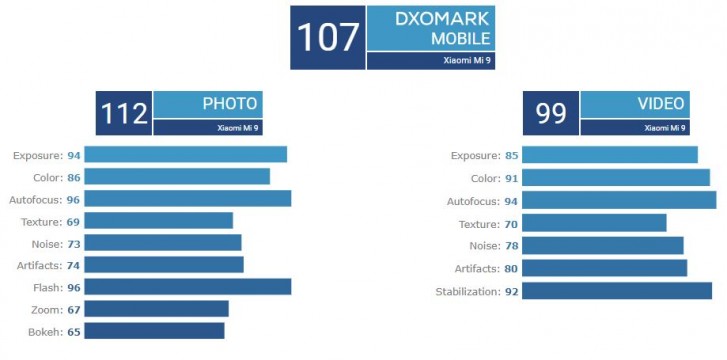

In their testing DxOMark found that the Mi 9's LED flash does an excellent job, keeping a fine balance between great exposure and color.
Where the Mi 9 could improve is in dynamic range (which is slightly limited), in shadow detail and in highlight contrast. The reviewers note that the Mi 9 produces slightly lower fine detail compared to the iPhone XS Max or Mate 20 Pro.



Xiaomi Mi 9 camera samples by DxOMark

The Xiaomi Mi 9 is the company's first phone with three rear cameras. A regular 48MP 1/2.0" 48MP Sony IMX586, a telephoto 12MP 1/3.4" Samsung S5K3M5 and a super wide-angle 16MP 1/3.0" Sony IMX481.
To know more about the phone and its cameras, check 

Comments

Popular posts from this blog

Apple releases new iOS 12 beta, putting a stop to infuriating update notification

A new iOS update is now available (for real) “A new iOS update is now available. Please update from the iOS 12 beta.” If you’ve been running the latest version of Apple’s beta software for OS 12, you’ve likely been pestered by this notification a whole lot over the last 24 hours. Dozens of times? Potentially hundreds? Yesterday, it started showing up every time an iOS device was unlocked — or even if you just pulled down the notification tray a little bit. Thankfully, just as we enter Labor Day weekend, Apple has shipped another iOS 12 update to restore sanity. If you open up your iPhone’s settings, iOS 12 public beta 10 (developer beta 12) is now available to download. Once you do, the obnoxious, constant alert — about an update that didn’t even exist — will go away. GuilhermeRamo managed to pinpoint what went wrong with the last iOS 12 beta. The build thought it was about to expire, thus setting off the string of notifications and mass frustration: This annoying hiccup...

Apple sold fewer iPhones but made more money thanks to the iPhone

Apple’s  first quarterly earnings reports for 2018  are in, and the  company has reported  that  it sold 77.3 million iPhones in Q1 2018  (which includes the holiday season). That number is down 1.24 percent year over year from last year (78.3 million). But despite the slump in sales, iPhone revenue increased overall year over year, up 11.69 percent from $54.38 billion to $61.58 billion. While predictions for the average sale price of iPhone units sold during the quarter ranged from $710 to $755, the actual ASP was $796 (compared to $694 in Q1 2017), which directly explains the increase of revenue despite the decrease in sales. That said, despite the record revenue, analysts were still expecting a slight increase of approximately 1.5 percent year over year for units shipped, not a decrease. My estimate for iPhone units was expecting a lot more iPhone 8 with an average pricing of $710. Actual ASP was $796. A LOT of iPhon...

11 tricks to make your Android run faster

frustrating to drop several hundred dollars on a high-end smartphone only to find that the smooth and speedy performance you expected remains elusive. Mid-rangers and the budget end of the market are even more prone to stuttering and lag. There are various ways to speed up that Android performance, and a few things you can do to make it feel faster. Make sure you’re up to date  The latest software will often contain bug fixes and general improvements and it can help your Android device to run better. Software updates tend to come OTA (Over The Air) and you should be automatically prompted to install them, but it doesn’t hurt to check. Go to Settings > About device > Software update and check for updates. The same logic applies to apps, so fire up the Play Store, open the menu at the top left and tap My apps and make sure all of the apps you use are up to date. Clean up your home screen  If you choose to use live wallpaper then consider replacing it with a good static...